CX Studio
A service design tool for design teams: understand experiences in layers, turn issues into solutions, and follow each change through handover and adoption by the teams who own it. I designed and built it myself.
My own product, in beta · 2026
- My role
- Everything, solo
- Team
- Built with Claude Code and ChatGPT
- Years
- 2026, in beta
- Outcome
- A beta in a protected review environment, with synthetic data
01 Ownership
What I did, and the tools I used.
My part
Research into existing tools
Product definition
The service model behind it
Interface design
The build, with AI agents
Verification and review standards
Tools, not a team
No team: a solo build
Built with Claude Code and ChatGPT
Independent review before each increment is accepted
Why I built it
I built the tool around how a service design team works.
Before building anything, I reviewed what already exists: journey management tools, whiteboards, CX platforms, research repositories and ecosystem mapping. Each covers one part of the work well. None connects understanding an experience, designing the change and following it through to adoption.
So I built one from the ground up, modular by design, so it can change as the team learns.
The model
People, journeys, blueprints and evidence, connected to what follows.
Three equal workflows connect the same people, journeys, blueprints and evidence. Pick a way in to follow it.
Everything connectsIllustrative
Three equal ways in
Layers
Every layer of the experience, and the service behind it.
Open the whole journey, step into a moment, then into a single interaction. Turn any of them over to see the service that makes it work.
Every layer, and the service behind itIllustrative
In the product
From decision to adoption.
Every change is followed through four checkpoints: handover, delivery support, delivery review and experience monitoring. The design team recommends, and the delivery owner decides what ships.
CX Studio · betaSynthetic data
What it does
What is in the beta.
Available to explore now, with synthetic data.
- 01Journeys in layers
Current and future journeys, from the whole experience down to a single interaction.
- 02Service blueprints
The service behind each interaction, with handovers recorded as agreements.
- 03Touchpoints, evidence and issues
Evidence and changes stay linked to their context, with issues and opportunities beside them.
- 04Decisions and adoption
Decisions, handover and adoption tracked at four checkpoints, with owners.
- 05Metrics and standards
Metrics, standards and principle checks, built into the underlying model.
- 06Templates and a library
Start from a template, reuse shared touchpoints, and keep an inspiration wall.
Planned nextWorkshop mode
A collaborative canvas where a team builds a journey together in the room.
Under consideration, not builtMore help from AI and data
AI drafts for a designer to review, connections to surveys, NPS and analytics, and roles that help people find what needs their attention.
02 Decision map
The decisions, and why.The pivotal decision.
Seven decisions I made in this work, and how or why I made each one. Where a figure shows the result, it is linked.
-
01
ChoseBuild the tool around the workInstead of
Fitting the work to an existing toolWhyA design team needs a connected way to understand experiences, build solutions and follow their adoption, not only individual features.
-
02
ChoseEvery layer of the experience, and the service behind itHow
The whole journey, a moment, a single interaction, and the service blueprint behind each one.
-
03
ChoseHandovers recorded as agreementsHow
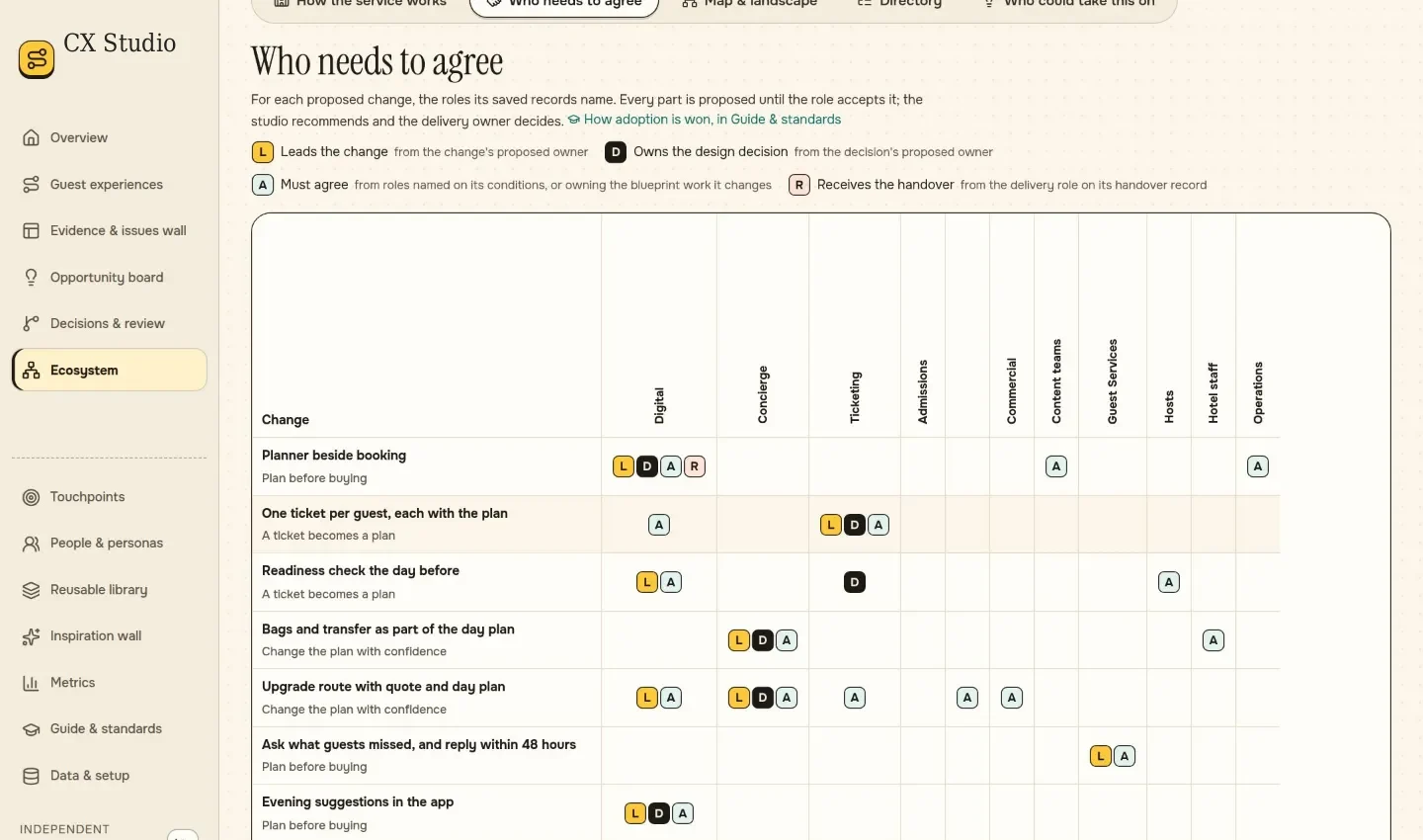
Each change shows who leads it, who owns the design decision, who must agree and who receives the handover. Proposed stays distinct from accepted.
See Fig. 5.1 ↓ -
04
ChoseEvidence standards built into the productHow
Every claim shows its source, whether it is still a hypothesis, and whether the data is synthetic.
WhyA count or a polished artefact is not treated as proof that something is ready to implement.
-
05
ChoseModular by designWhy
So it can change quickly as the team learns, without rebuilding the core.
-
06
ChoseVerify each increment before accepting itHow
Contract tests, full browser tests and an independent review before an increment is accepted.
-
07
ChoseSynthetic data only, for nowWhy
Identity, hosting, data retention and ownership need decisions that are not yet made.
03 Evidence
The work behind the decisions.
Select a figure to open it larger.
Supports decision 3 ↑
Supports decision 4 ↑
Supports decision 4 ↑
A beta running in a protected review environment, with synthetic demonstration data. Usability testing with people is still to come.
Contact
Open to design leadership roles.
I’m based in Singapore and can work in Singapore and the EU without sponsorship. Available now.