Bringing AI into UX work
How could different UX teams use AI tools well, with clear protocols for how to use them across the UX lifecycle? The goal was a structured, scalable way of working that kept teams consistent.
Yara International · 2026
- My role
- Led the initiative
- Team
- 2 UX designers, 1 front-end developer
- Years
- 2026, 3 months
- Outcome
- Documented protocols
01 The full story
A strategic, documented methodology for integrating generative AI into professional UX workflows.
The brief
How can different UX teams embrace AI tools to work better with clear protocols on how to use them across the UX lifecycle?
The goal was to define a structured and scalable approach that ensures consistency and efficiency across teams.
My role
Personally led the initiative to introduce new operational capabilities that integrated AI into UX design, UX research, and service design workflows.
The work involved identifying relevant tools, defining testing protocols, building real use cases, and producing clear guidance on what worked, what did not, and how each tool could be used effectively in future practice.
- 06.A
Figma Make as a sprint tool
We explored how to use Figma Make as a way to improve workshop sessions and speed how participant ideas could be captured and visualized instantly. By introducing this tool into sprint design workshops, we shifted the focus from manual sketches to a collaborative discovery process using digital AI help.
The tool allowed for rapid visualization that helped stakeholders feel their input was being accurately represented in the room. This speed turned static meetings into faster iterative sessions, making it easier for the group to align on a direction and decide which concepts to follow further.
- 06.B
Figma Make as a data-hungry prototype maker
One of the biggest challenges with prototypes has always been representing and populating realistic data sets. This is an intensive task for designers, and for professional tools, making business decisions without proper data often leads to derailed discussions and a lack of context.
We found that Figma Make was extremely effective at populating prototypes and concepts with validated real data, even allowing for dynamic interaction.
The end result was a much better way to test with better context while reducing the time it takes to build prototypes in complex cases. By ensuring the data was realistic, we moved away from generic placeholders and allowed stakeholders and users to focus on the actual usage scenarios.
A clear case of where AI has a clear advantage of use.
- 06.C
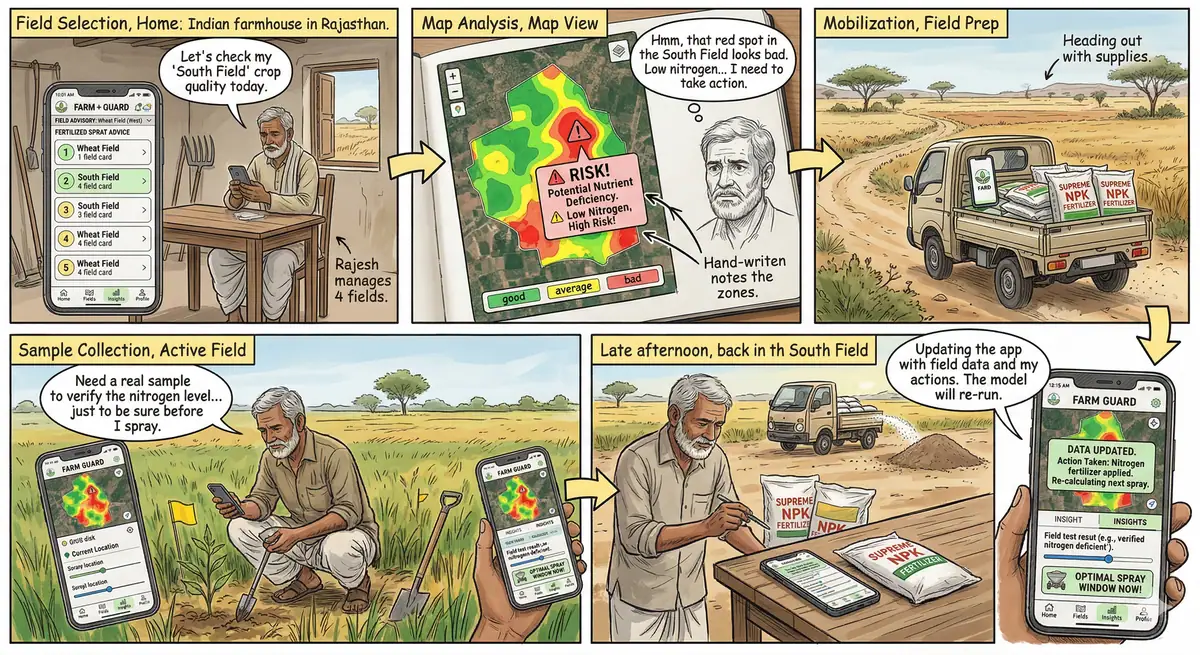
Building user stories with Gemini Nano Banana
We identified a specific strength in using Gemini Nano Banana to generate user stories and storytelling vignettes. These small visual narratives became a powerful way to showcase interaction models and user journeys in a highly accessible format. By building structured, visual showcases of a journey, we helped key stakeholders understand pain points and opportunities with much more clarity than traditional documentation allowed.
This process made it possible to create multiple outcomes to demonstrate the direct impact of a new feature on the end user.
Consistently producing these visual artifacts opened new ways of presenting user insights for the business to make informed decisions. While the tool provided the initial structure and speed, the true value came from our iteration and validation, ensuring every story was accurate. It was about storytelling that drove decision making, not just automated text generation.
- 06.D
User agents for UX research
One of the most promising areas we explored was the development of personas as AI agents. We built these agents to interact with our prototypes and concept screens, allowing them to provide feedback and perform tasks so we could measure their success rates.
Our early work showed that these agents effectively represent end user behavior and are highly useful for providing quick feedback loops on how the work is progressing.
While this is not a replacement for human testing, it is a powerful tool to get constant feedback and eliminate the first layer of friction when building products.
By using agents to identify early problems, we ensure that our research with real people can focus on uncovering deeper insights and complex emotional responses rather than basic usability errors.
02 Ownership
What I did, and what the team did.
03 Decision map
The decisions, and why.The pivotal decision.
Three decisions I made in this work, and how or why I made each one. Where a figure shows the result, it is linked.
-
01
ChoseTest tools on real use cases before writing rulesWhy
So the guidance came from what actually worked in our projects, not from the hype around each tool.
See Fig. 6.1 ↓ -
02
ChoseAI personas as agents, to catch the first layer of usability frictionInstead of
A replacement for testing with peopleWhySo research with real people could focus on deeper insight rather than basic usability errors.
-
03
ChoseFigma Make for live visualisation in workshopsHow
Also used to fill prototypes with realistic data.
04 Evidence
The work behind the decisions.
Select a figure to open it larger.
Supports decision 1 ↑
Documented protocols and rules for using AI in design, research and service design, so every team works in the same way.
New UX AI protocols and rules to bring new ways to embrace the power and innovation AI brings to our field.
By avoiding a rushed approach to AI, we established clear, documented processes that enable consistent and scalable ways of working across the organization.
Contact
Open to design leadership roles.
I’m based in Singapore and can work in Singapore and the EU without sponsorship. Available now.